TWITCH FEATURE GUIDE / STREAMER SHOUTS
Twitch Streamer Shouts
Thank viewers even when you are offline.
An actual Shout sent by Coyote.
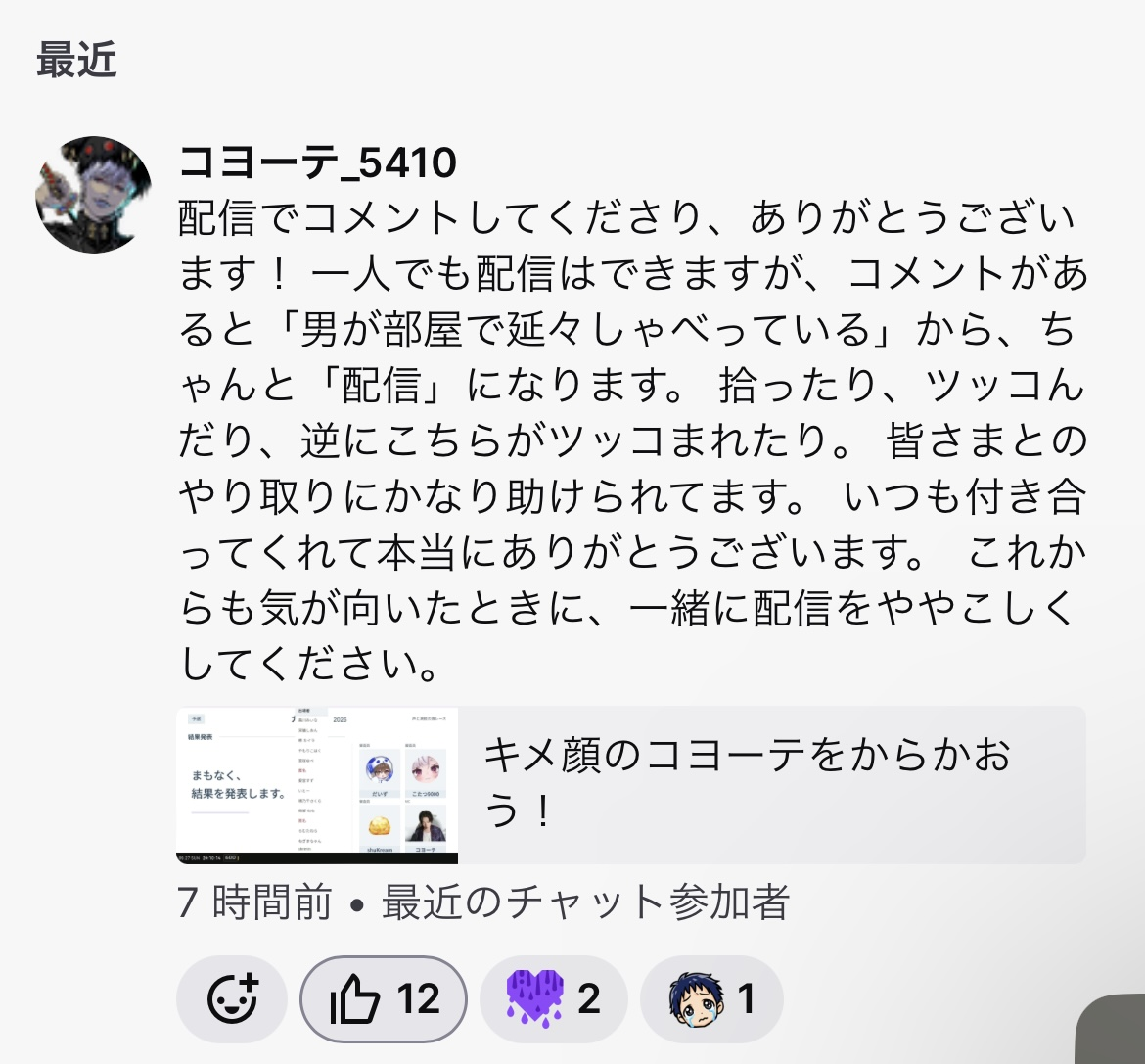
Read the message in the image
Thank you for commenting on stream! I can stream alone, but with comments it becomes an actual “stream” instead of “a man talking endlessly in a room.”
I respond to comments, joke with you, and sometimes get teased myself. Your participation helps me a great deal. Thank you for being here.
Whenever you feel like it, please keep making the stream more complicated with me.
Log in to your account in a browser, then go to “Content” → “Streamer Shouts”.
If another page opens on your phone
If the Twitch app opens instead, copy the URL below and paste it into the address bar in Safari or Chrome.
A take from COYOPEDIA.
In a way, a simple Twitch CRM.
This compares thanking viewers, commenters, followers, and subscribers—and maintaining contact outside a stream—to customer relationship management.
What does “a simple Twitch CRM” mean?ContentsTap a heading to jump there
Official information at a glance
Thank-you messages delivered outside the stream
Streamer Shouts are messages from a streamer to groups of viewers. You cannot send one to a named individual.
Coyote confirmed that individuals cannot be specified in his own interface on October 1, 2026.
- Decide what to thank people forWatching, commenting, following, subscribing, and more
- The streamer sends thanksA message and clip to a target group
- Viewers receive itRead and react in the Shouts tab
- What can you send?
- A written message, optionally with a clip.
- Where does it arrive?
- In the viewer’s Shouts tab: under Activity on mobile and Notifications on desktop, according to the guidance.
- Can recipients respond?
- They cannot reply directly, but they can react.
- How often can you send?
- Once per day to each viewer group.
The delivery location, replies, and sending frequency are based on Official Twitch Help search-result excerpts.
Three similarly named features
An opportunity to connect outside the stream
What is CRM?
CRM means customer relationship management: a way for a business to organize interactions and maintain relationships with customers.
In the streaming analogy, the business is the streamer and the customers are viewers. The comparison is about expressing appreciation and continuing contact outside a live stream.

CRM stands for Customer Relationship Management. For the term’s meaning, see Salesforce’s explanation.
“Simple CRM” is not an official Twitch classification. As of October 1, 2026, a streamer can select groups but cannot see who belongs to them or address individuals. Unlike CRM, it does not manage sending history or later return visits for each viewer.
The recipient scope and limitation on selecting individuals are based on Coyote’s own use.
Official positioning: Twitch describes it as sending messages to viewer groups and celebrating events and milestones.The official May 2026 announcement says the message appears in the activity feed.
The same announcement thread described an experiment with a small number of streamers. That historical announcement does not establish current availability.
The following is an interpretation by COYOPEDIA.
Put everyday gratitude into words again.
Thank people for conversations sparked by comments or for subscription support. Even appreciation expressed live can be shared again afterward. It can also thank followers who have not recently attended for their past support.
Welcome a first participation, thank people who keep returning, or celebrate a follow milestone together. Such messages may help people feel closer to a streamer or remember an enjoyable broadcast.
Attracting a first-time visitor and encouraging a return are different challenges. Streamer Shouts can help continue contact with people already reached.
Twitch may also hope that interaction outside broadcasts encourages continued use. But benefits to future viewing or subscriptions are hypotheses; the feature has not been proven to raise return rates or concurrent viewers.
Share appreciation, and create opportunities for connection.
Suggestions from COYOPEDIA.
For senders and recipients
Streamers can express everyday thanks
Thank people in your own words for watching, commenting, following, or subscribing. It can express thanks missed live or celebrate long-term support again.
Viewers can receive a welcome or thanks
A message of appreciation may make a streamer feel more familiar. Viewers can revisit the broadcast through an attached clip and respond with a reaction.
Not everyone enjoys receiving messages. Being able to send is different from someone wanting to receive. There is no need to send every time or react to every message.
Quiet viewers are spending time with the stream too. Comments or payments need not be conditions for appreciation.
Who receives which words?
Eight situations and examples
Choose wording suited to the recipient, whether thanking them for watching or commenting, celebrating a follow milestone, or appreciating a subscription. The examples below are eight use cases, not a list of official groups. Before using one, check whether a matching recipient group appears on your screen and read its description and conditions.
01Welcoming raid visitors
- What to say
- Make people feel welcome even in a new place.
- What to avoid
- Distinguish thanking the raiding streamer from thanking the viewers who joined.
02Thanking followers
- What to say
- Express thanks and add a short note about enjoying future streams.
- What to avoid
- Do not assume everyone who followed is visiting for the first time.
03Thanking first-time commenters
- What to say
- Welcome them for speaking up.
- What to avoid
- Do not make them feel obliged to comment again.
04Thanking recent chat participants
- What to say
- Thank them for joining the conversation.
- What to avoid
- Do not write as if you spoke to every recipient individually.
05Thanking returning viewers
- What to say
- Use words that feel welcoming after a gap.
- What to avoid
- Do not guess why they were away or returned.
06Thanking people who keep returning
- What to say
- Appreciate their continued visits.
- What to avoid
- Do not track attendance or ask them to maintain a streak.
07Celebrating a follow milestone
- What to say
- Thank them for their involvement so far.
- What to avoid
- Do not add unverified years, dates, or history.
08Thanking subscribers
- What to say
- Thank them for their support.
- What to avoid
- Do not ask for an additional purchase or renewal.
The actual sent example is labeled “Recent chat participants.” Do not infer “absent for a while,” “returned,” or “regular” from the group name alone; read the description. If conditions are unclear, use wording such as “Thank you” without assuming a participation history.
How streamers use them
The dashboard entry point was checked in a desktop browser. The steps below use official guidance and Coyote’s interface. Compare button names and placement with your current screen.
Open your Streamer Shouts page
In a browser, sign in to the Creator Dashboard and open Content → Streamer Shouts. If your phone opens the Twitch app or another page, use copy URL at the top to open it in Safari or Chrome. If you cannot find the item, go to FAQ.
Read the recipient description
Check which viewers qualify for the target group. Individual names are not visible. Do not rely on the group name alone; read any time period or conditions shown.
Write the message
Briefly state what you are thanking people for.The eight examples can help.
Choose a clip if needed
Pick one that makes sense even to someone who did not see the moment.
Review before sending
Use the checklist below to check the recipient, text, and attachment.
Send through Twitch
Once ready, follow the current interface to send. The one-per-group-per-day limit is separate from how often it is actually appropriate to send.
Check what happens afterward
Official help says the Shouts tab lets you review delivery and reactions. See how to interpret results for the numbers.
As of October 1, 2026, a sent Shout cannot be edited or unsent.Check the audience, text, and attachment before sending.
Confirmed through Coyote’s own sending experience on October 1, 2026.
I do not recommend sending the same message to every group every time. Choose the group that fits what you want to say, and send when there is a reason.
Messages, clips, sending frequency, and reactions: Official Twitch Help. Recipient selection and the pre-send checklist are suggestions from COYOPEDIA.
Where do recipients see it?
Read the message in the Shouts tab and watch any attached clip. React if you want.This feature does not offer direct replies.It is fine to close it after reading.Official Twitch Help
Original examples by COYOPEDIA.
Eight ready-to-use thank-you messages
These eight examples were written by COYOPEDIA. Read the group description on your screen and adapt the wording to your own voice.
You can also skip the examples and briefly write what made you happy on stream or what you appreciate. Avoid pretending to be closer than you are or adding events you do not remember.
“Copy example” copies only the text. It does not send anything to Twitch.
To raid visitors
Thank you for joining through the raid! I hope you felt comfortable even in a new place. Drop by whenever you have time.
Thanking followers
Thanks for following! If a future stream interests you, feel free to stop by. You are welcome whether you want to chat or simply watch.
Thanking first-time commenters
Thanks for commenting for the first time! A single message can send the conversation somewhere unexpected—that is part of the fun. Join in whenever you feel like talking again.
Thanking recent chat participants
Thanks for chatting on stream! Unexpected topics sparked by comments are one of the things I enjoy. I look forward to spending time together again.
Thanking returning viewers
Thanks for coming back! You are welcome whether it has been a while or you join midway. I hope you can relax and enjoy the stream whenever you have time.
To returning viewers
Thanks for coming back regularly! I hope the streams have become one small part of your day to enjoy. Please keep joining at your own pace.
For a follow milestone
I am glad we could reach this follow milestone together. Thank you for being here! I hope the stream remains a place you can drop into whenever it comes to mind.
Thanking subscribers
Thank you for supporting the stream with a subscription! Your support encourages me to keep streaming. I hope you continue to enjoy it.
A suggestion from COYOPEDIA.
Say “thank you” rather than “come back”
A brief mention of a topic sparked by chat or a moment enjoyed together can make the thanks specific to the stream. Rather than stacking announcements, try this short structure:
Choose a clip that fits the message. Avoid scenes requiring a long explanation of inside context, and watch for spoilers such as a game ending.
Wording to avoidYou have not come lately.
Try this insteadThanks for coming back to watch.
Wording to avoidYou have to come next time!
Try this insteadPlease drop by whenever you have time.
Wording to avoidI feel lonely when you do not react.
Try this insteadEnd with thanks without asking for a reaction.
Thanks can feel heavy when they become an attendance check for next time. Do not write as if personally close to everyone; show equal respect to quiet viewers and people who do not react.
When you have something to say, such as everyday thanks or a milestone greeting, check the group and send it. There is no need to message every group every day.
A reaction is not the same as a return visit
Official help describes checking sent-message status and reactions.Official Twitch Help Separate the following stages when reading numbers. The Shouts screen does not track whether each recipient returned for the next stream.
More reactions to a Shout do not prove that the next stream will have more concurrent viewers.
Record labels as shown
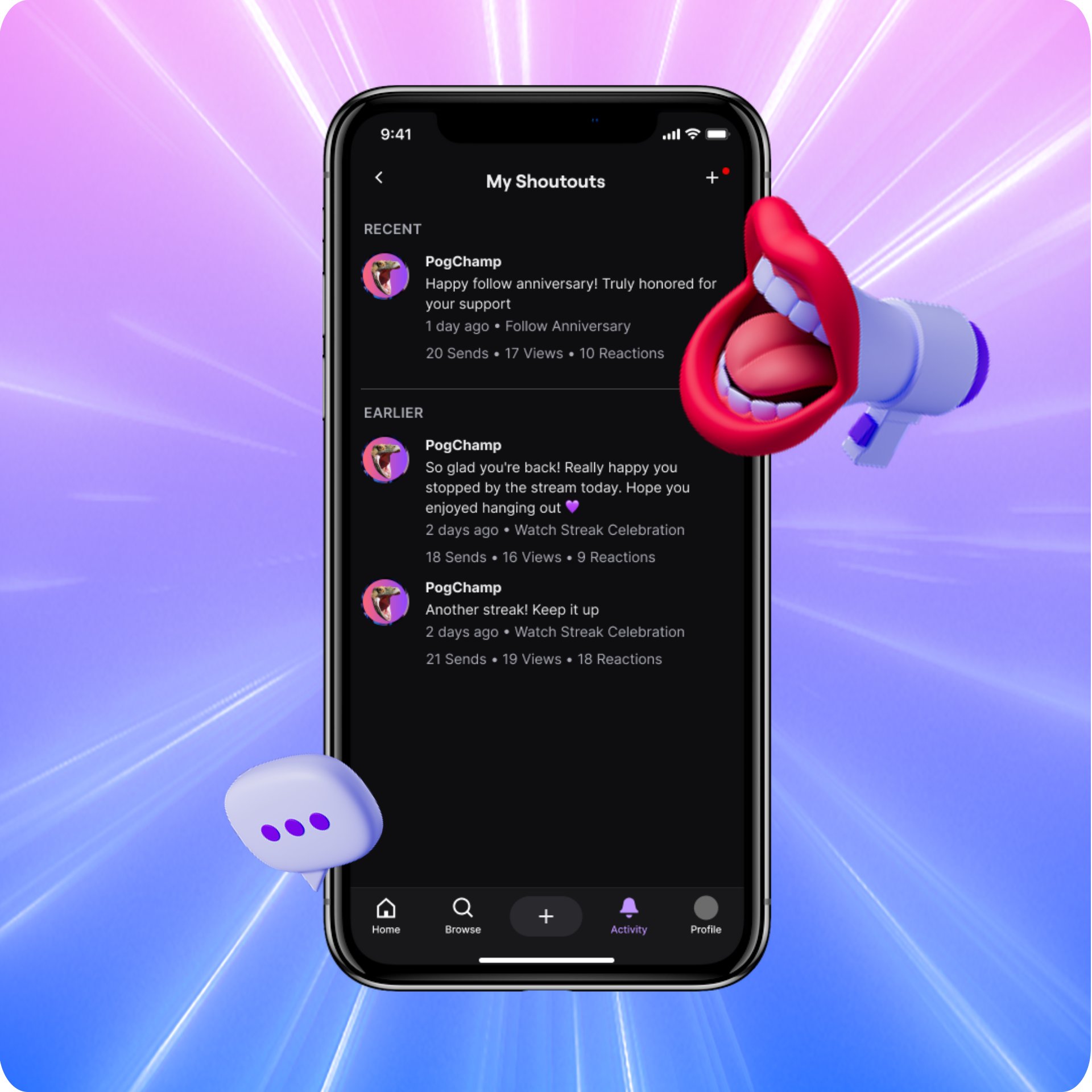
The May 2026 official announcement image displays “Sends / Views / Reactions.” It is an example screen; the labels alone do not establish deduplication or counting units. Check the labels and definitions on your own screen.
- Do not replace “events” with “people” without checking.
- Do not call Views the number of people who read or returned to the stream.
- Do not assume Sends equals successful deliveries or people actually shown a notification.
- Do not assume a lack of reaction means dissatisfaction.
Reaction counts alone cannot measure closeness.
The example at the top also shows reactions at the time of capture, not the number of readers or people who returned to the next stream.
When comparing sends, views, and reactions, record the same message at the same time. To compare wording, align audience and counting conditions and use the same elapsed time. A small denominator makes even a one-event difference large.
See an example calculation
This is a hypothetical arithmetic example.Assume 100 recipients, 40 viewers, and 8 reactions are confirmed as deduplicated people in the same audience and observation period.
Percentage who viewed
40 ÷ 100 = 40%
Percentage of viewers who reacted
8 ÷ 40 = 20%
These are not Twitch’s actual counting definitions, averages, or targets. If the conditions cannot be confirmed, do not apply this calculation; record the screen values as shown.
Separate data is needed to assess return visits
The proportion of returning viewers is not the return rate of people who received this Shout. If numbers rise afterward, differences in content, day, start time, or raids prevent attributing the rise to the Shout alone.
Calculating recipients’ return rate requires data linking recipients to subsequent visits. As of October 1, 2026, the Shouts screen does not identify recipients individually. Its numbers alone cannot provide recipient-level return rates.
First-time participants and regulars interact differently. Comparing messages sent to each does not establish that one text worked better. Do not treat comparisons across different audiences or conditions as the effect of wording alone.
When reading alongside overall stream metrics, see Eight Twitch Analytics metrics explained.
Troubleshooting and FAQ
What if I cannot find Streamer Shouts?
In a browser, sign in to the Creator Dashboard, sign in and look for Content → Streamer Shouts. If a phone opens the Twitch app or another page, use copy URL at the top and paste it into Safari or Chrome.
If the item is absent from the dashboard, check the guidance shown or Official Twitch Help for current availability. Do not assume the reason is Affiliate status, operating system, or another particular factor.
Who receives it? Can I choose names?
It goes to the selected viewer group. As of October 1, 2026, a streamer can see only the group, not individual names, and cannot select a named person. Coyote confirmed this through use.
Before sending, read the group description shown on screen.
Is this an individual message just for me?
It is sent to a group, so the text you receive may not be exclusive to you. Read it as thanks or congratulations from the streamer, not necessarily a personally addressed DM.
How do I reply or react?
Read it in the Shouts tab and react if you like. Official guidance says direct replies are unavailable; reactions are optional. See What recipients see for the numbers.
What if I hit the daily limit?
The guidance says once per day per viewer group. Wait until sending is available again. I do not recommend sending the same content to another group to get around the limit.
Can I edit or unsend a mistaken message?
As of October 1, 2026, sent text cannot be edited or unsent. Coyote confirmed this through actual use.
If you sent incorrect information, offer a brief correction if needed. That will not remove the original Shout. For a minor typo, consider whether another notification is worthwhile.
Does using it increase recommendations or concurrent viewers?
Nothing reviewed guarantees that. Expressing appreciation and encouraging connection are operational aims; they do not mean increased recommendations or viewership have been demonstrated.View reactions and return visits separately.
To express thanks and continue connecting
Send when you have a real thank-you to share.
You do not need to use every available send.
Is it thanks for spending time together on stream, or for a follow or subscription? Once you know why you want to send it, choose a group that fits and put your thanks into a few words.
Scope reviewed
On October 1, 2026, we reviewed Twitch Support’s May 2026 announcement, its image, and a post in the same thread describing the test scope. Details such as delivery location and daily limits use excerpts from official-help search results.
The Content → Streamer Shouts entry was checked in a desktop browser. Because mobile links may open a different Twitch app page, the dashboard URL can be copied for a browser.
On October 1, 2026, Coyote confirmed through use that recipients are selected as groups, individual members cannot be seen or selected, and sent text cannot be edited or unsent.
On October 2, Coyote’s dashboard displayed “Regulars and others”; we checked its label and description.
The actual sent example is Coyote’s own message and screen.
This is an unofficial guide. It distinguishes official information and Coyote’s use and observations from the analysis and examples provided by COYOPEDIA.
Sources and related resources
- Streamer ShoutsOfficial Twitch Help. Search excerpts were used for text, attachments, delivery, frequency, and reactions.
- May 2026 Streamer Shouts test announcementTwitch Support’s explanation of messages to viewer groups and official screen example。
- Test audience at announcementThe same Twitch Support thread described an experiment with a small number of streamers at the time.
- ShoutoutsOfficial Twitch Help, distinguishing promotion of another channel.
- Bits Cheering guideOfficial Twitch Help, distinguishing Cheers using Bits.
- How to Use ClipsOfficial Twitch Help, supplementary material on clips.
- What is CRM?Salesforce, consulted for the general meaning of CRM. The comparison between Shouts and CRM is an interpretation by COYOPEDIA.